Blog · AI Agents
Your First Week at NinA AI: 8 Architectures for AI Agents
Olaf Lemmens, Founder NinA AI Agency · May 17, 2025 · 7 min read
We welcome Caroline Tichelaar as our brand new AI Developer!
Last week Caroline walked into our office for the first time. Bachelor's in Psychobiology, Master's in Artificial Intelligence at VU Amsterdam, and now — via an enthusiastic client introduction — developer number 4 and employee number 7 at NinA AI.
From day 1 she dove into n8n, rebuilt every conceivable AI Agent pattern and immediately wrote a crystal-clear guide to go with it.
That work shouldn't go unused, so besides being a great internal document, it also forms the basis of this newsletter: a practical tour of all AI Agents we use daily for clients.
TL;DR
- ▸A quick tour of 8 architectures for AI Agents — from solo agent to full hierarchy.
- ▸Each architecture with a short, practical example.
- ▸Want the full, detailed PDF overview? Just respond; I'll gladly send it to you.
The architectures at a glance — with examples
Note ⇢ The power of agents lies in combining context, tools and decision logic. Think of each setup as LEGO: modules you can stack into a custom workflow.
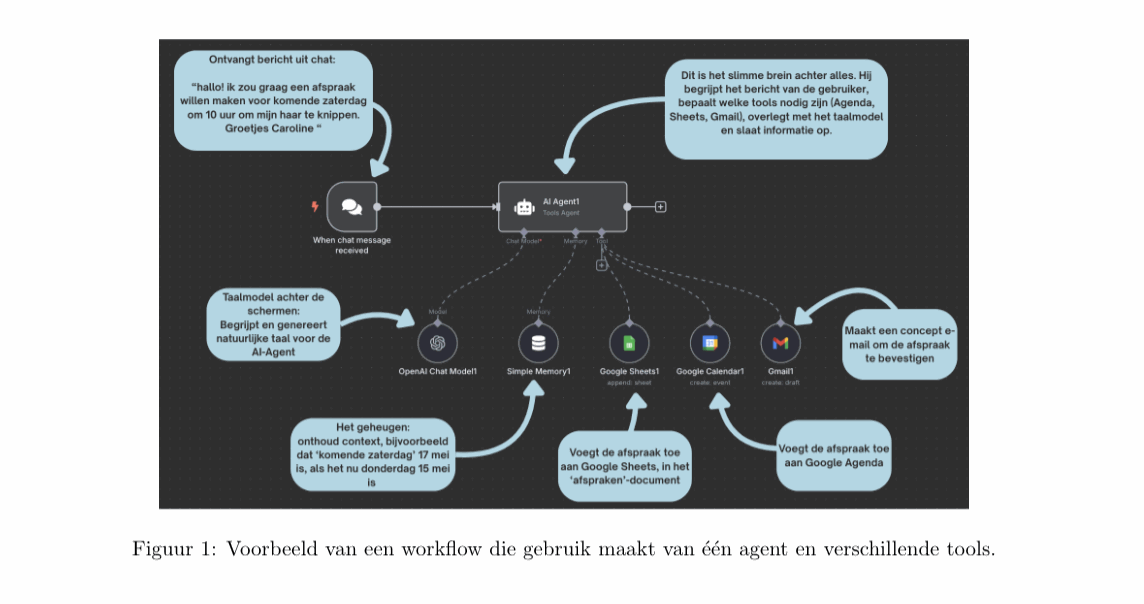
1. Single Agent + Tools
What it is. One agent that independently calls external tools.
Example. A hairdresser lets customers book via WhatsApp; the agent extracts date/time from the message, books via Google Calendar and immediately sends a confirmation email.
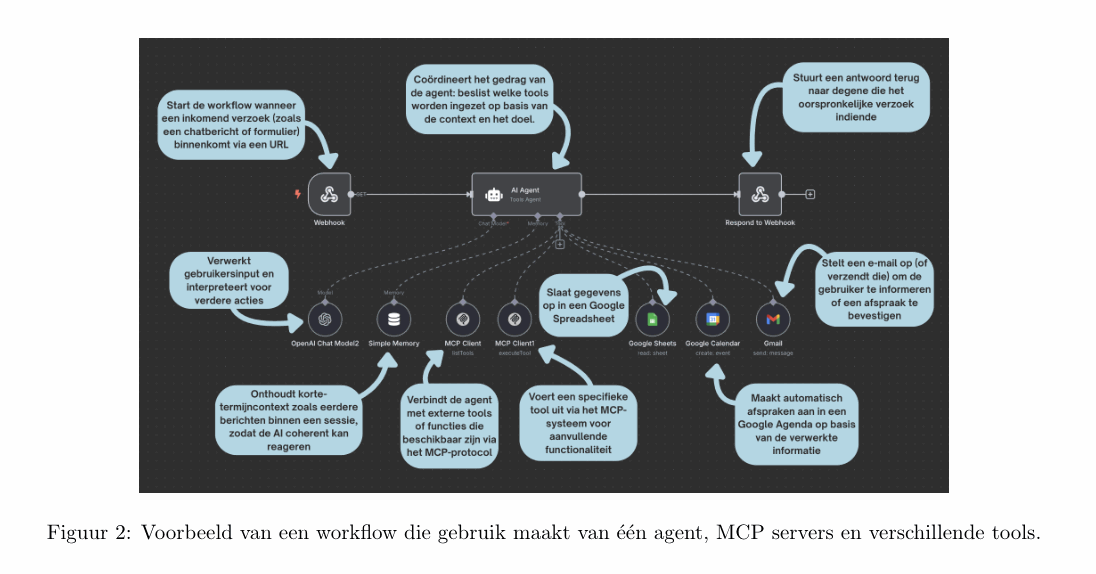
2. Single Agent + MCP Servers + Tools
What it is. The same agent, but with a Model Context Protocol layer for secure data and tool access.
Example. A travel agency has an agent calculate prices via an internal MCP server and immediately process the booking in Sheets, Calendar and Gmail.
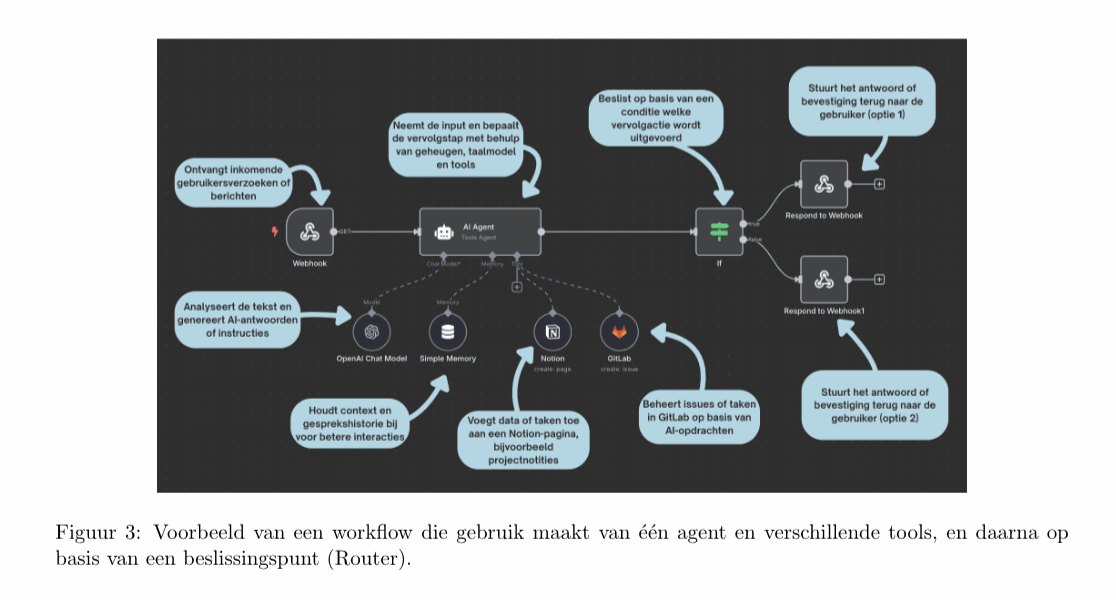
3. Single Agent + Tools + Router
What it is. The agent decides via a router node which tool or action follows.
Example. Incoming tasks are automatically routed to Notion (content) or GitLab (code), depending on the agent's classification.
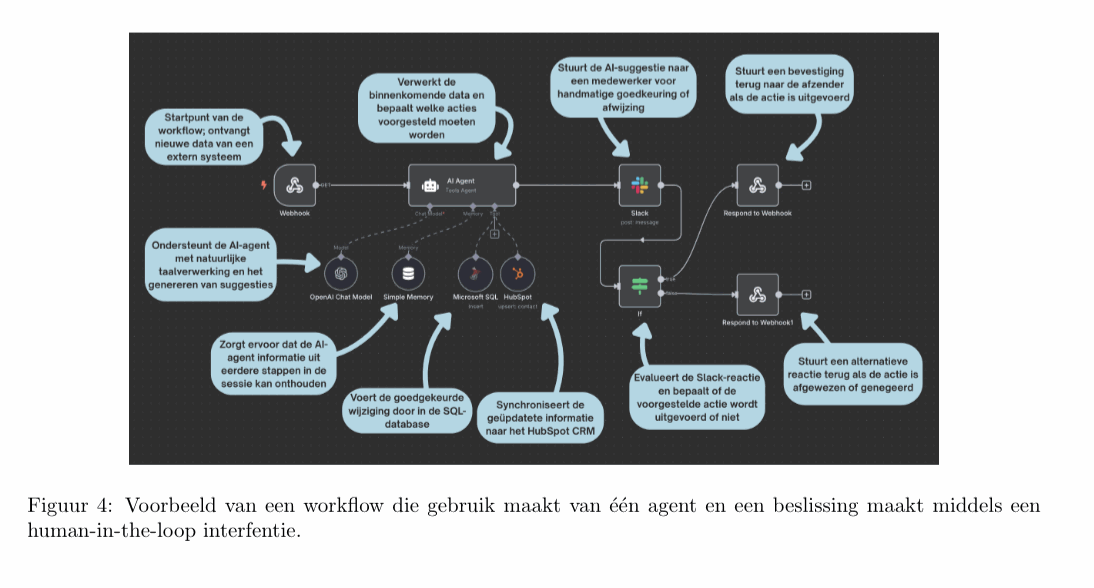
4. Single Agent + Human-in-the-Loop + Tools
What it is. Automation with human approval.
Example. CRM cleanup: the agent suggests improvements, a colleague approves via Slack, after which SQL and HubSpot are updated.
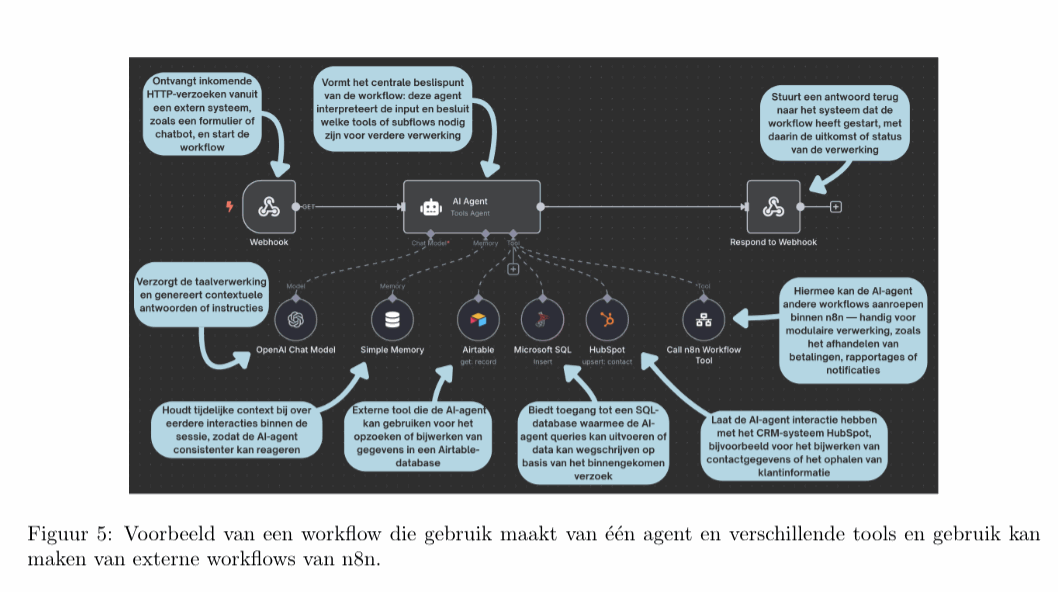
5. Single Agent + Dynamically Call Other Agents
What it is. One conductor agent that calls sub-workflows or specialist agents on the fly.
Example. A support agent decides, based on the customer question, to start a separate Payment workflow or retrieve data from Airtable.
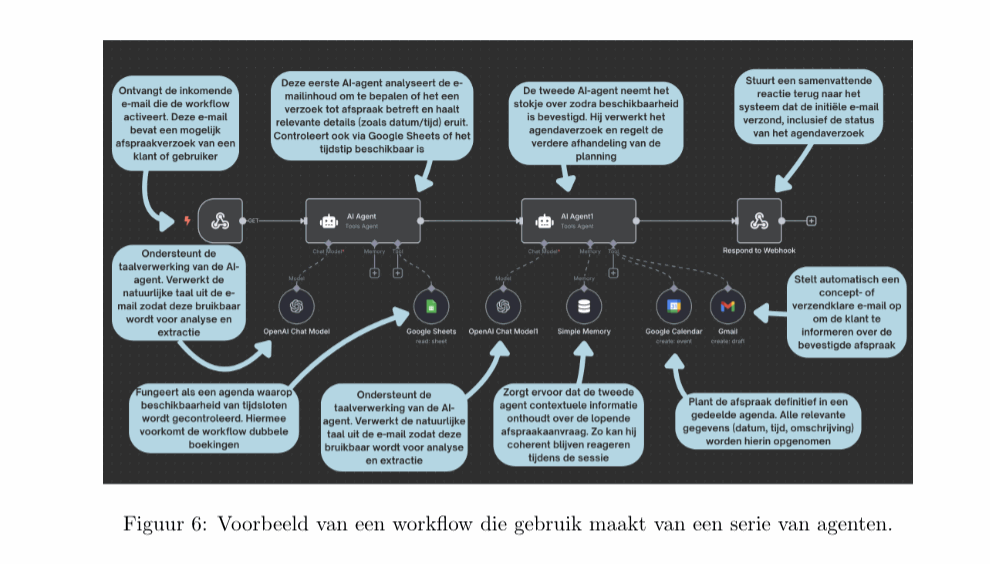
6. Sequential Agents
What it is. A chain of agents that follow each other sequentially.
Example. Agent A recognizes an appointment request in an email and validates availability; Agent B schedules the appointment in Calendar and emails the client.
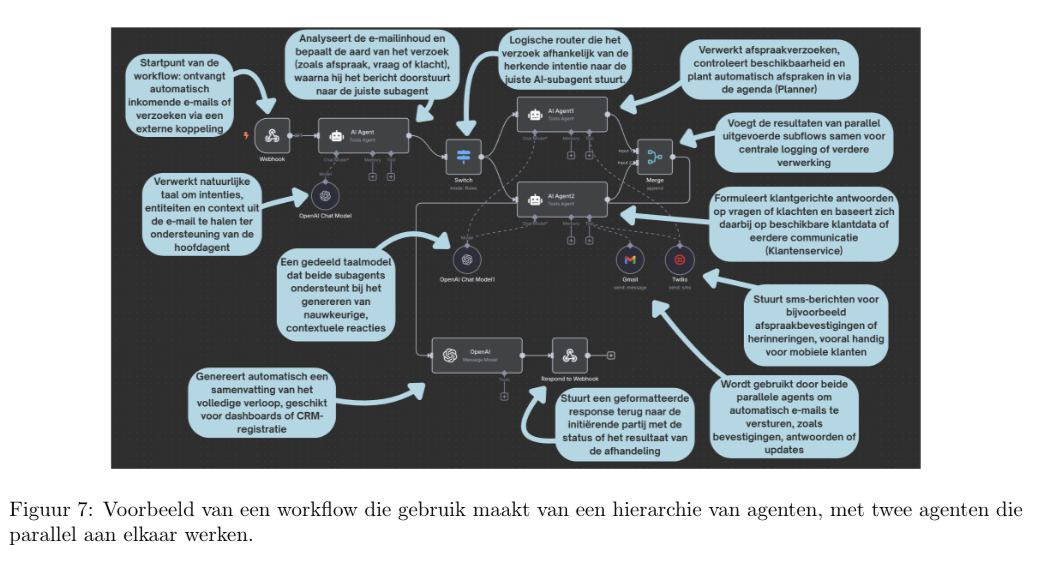
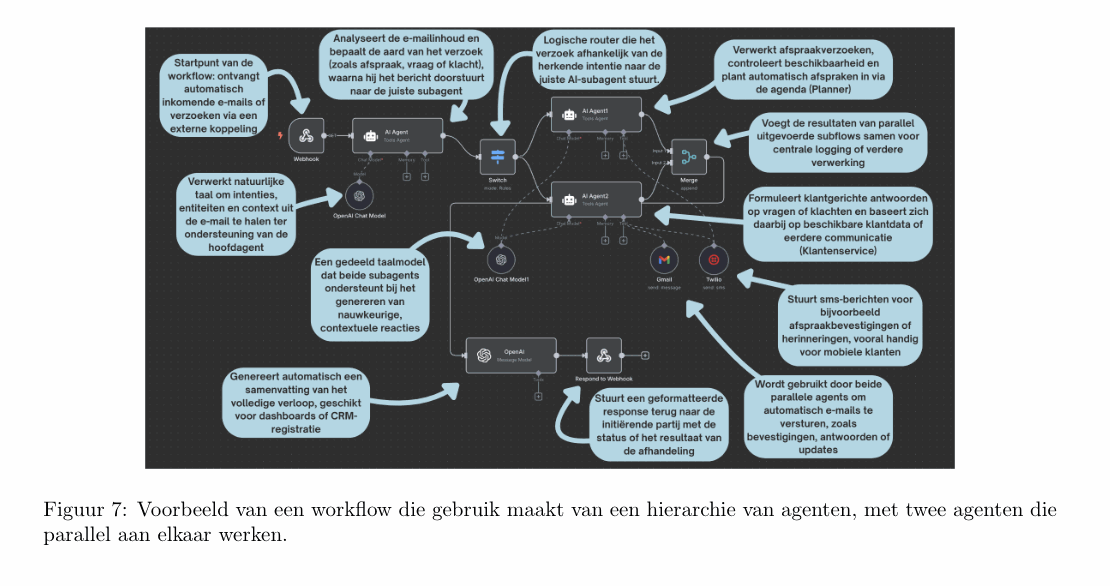
7. Agents Hierarchy + Parallel Agents + Shared Tools
What it is. A main agent routes tasks to parallel sub-agents; they share the same tool stack.
Example. Main agent classifies emails; Planner agent handles appointments, Service agent answers questions. Gmail and Twilio are shared by both.
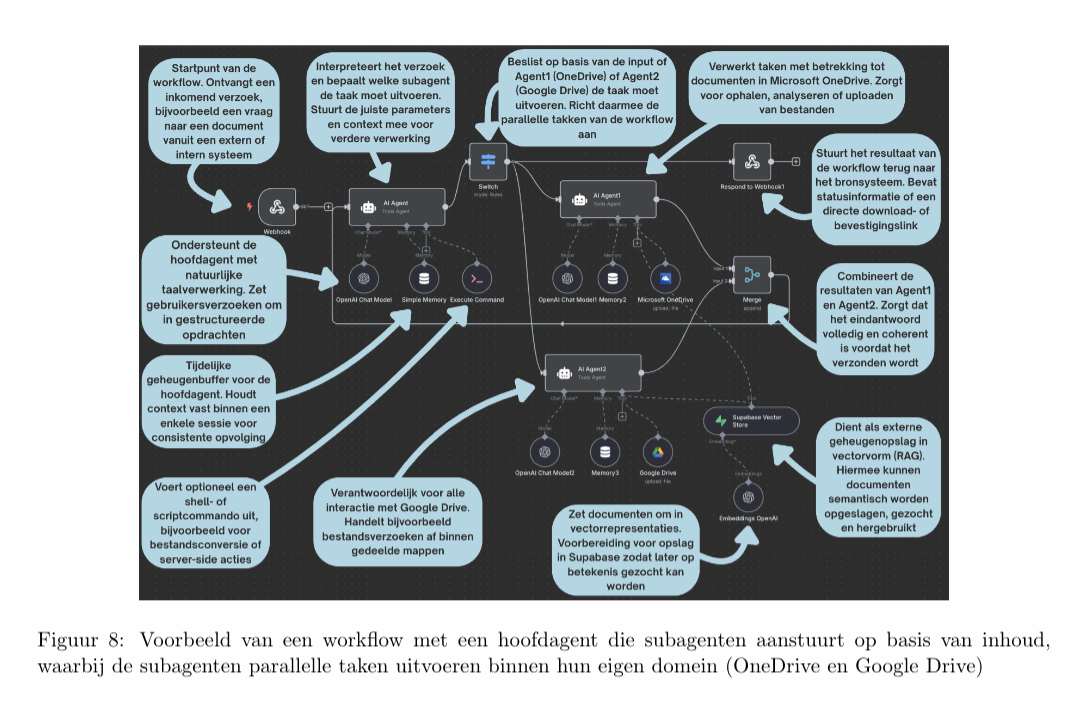
8. Agents Hierarchy + Loop + Parallel Agents + Shared RAG
What it is. Same hierarchy, but with shared vector memory (RAG) and feedback loop.
Example. Document service: OneDrive agent and Google Drive agent retrieve files, embed them in Supabase and deliver everything back via one endpoint.
Conclusion & my opinion
Caroline showed in one week how quickly you can create value with the right architecture. The core? Start small (one agent), but design modularly so you can scale up to complex hierarchies without friction.
I believe every company in 2025 has at least one agent-driven process live. The question is not whether you start, but which workflow you automate first.
Which of the eight architectures would you most like to see in your organization — and why?
Call to action
We have Caroline's PDF guide with all diagrams ready. Want to read it? Leave a comment, and I'll send you the download link.
Prefer to get started directly? DM me to discuss the possibilities of building AI Agents in your own environment.
Until next time,
Olaf Lemmens
Founder · NinA AI Agency
P.S. Want to learn how to work with AI Agents, or join another AI Workshop? Check out www.aisummerschool.nl and claim your ticket!